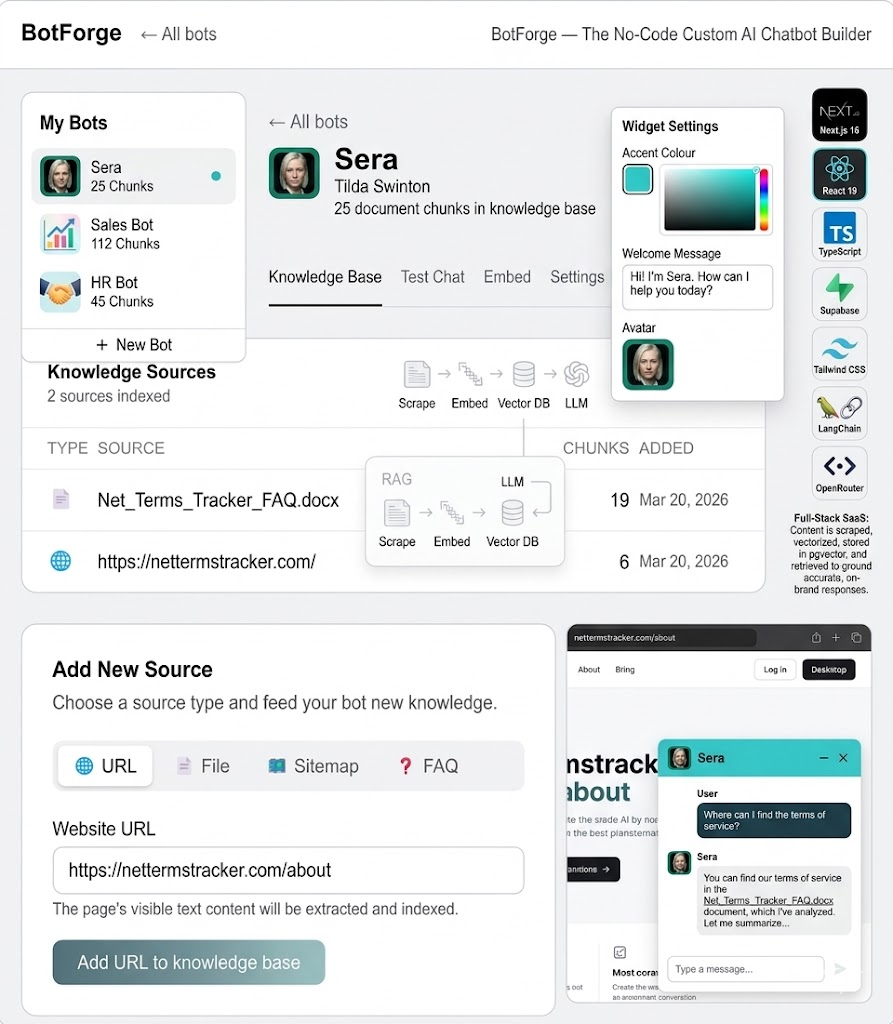
What is QuartzBot, and Why RAG?
QuartzBot is a platform that lets businesses deploy AI chat assistants trained on their own documentation, knowledge base, and product data. Think of it as a white-label ChatGPT that actually knows your product — your pricing, your return policy, your troubleshooting guides — rather than hallucinating answers from its training data.
The technology that makes this possible is Retrieval-Augmented Generation, or RAG. Instead of fine-tuning a model (expensive, slow, requires ML expertise), RAG works by finding the most relevant documents from your knowledge base at query time and inserting them into the prompt context. The LLM then generates an answer grounded in your actual documentation rather than its general training.
The result: an AI assistant that is accurate, up-to-date, and constrained to your domain. When a customer asks "What's your return policy for sale items?", the bot retrieves the exact paragraph from your policy document and generates a helpful, accurate response — not a generic guess.
RAG vs. Fine-Tuning: Fine-tuning bakes knowledge into the model's weights at training time, which is expensive and requires re-training whenever content changes. RAG retrieves knowledge at inference time from a live database. For business knowledge that changes regularly (pricing, policies, product catalog), RAG is almost always the right choice.
The Architecture at a Glance
Before getting into each component, here's the full pipeline from document upload to streamed response:
The ingestion pipeline runs at document upload time. The query pipeline runs on every user message, typically in under 300ms from message send to first streamed token. Let me walk through each stage.
Stage 1: Document Ingestion and Text Extraction
QuartzBot supports four document types: PDF files, Word documents (.docx), plain text, and web URLs. LangChain's document loaders handle the heavy lifting here. For PDFs we use PyPDFLoader, for Word files Docx2txtLoader, and for URLs we use a combination of WebBaseLoader with BeautifulSoup stripping to remove navigation, headers, footers, and scripts from the extracted HTML.
The output from all loaders is a list of Document objects — essentially a text string plus a metadata dictionary containing the source, page number (for PDFs), and any custom tags the user attaches during upload.
Stage 2: Semantic Chunking
This is where most RAG implementations go wrong, and where we spent a disproportionate amount of time. Chunking strategy has a direct, measurable impact on retrieval quality.
The naive approach is fixed-size chunking: split every document into 512-token chunks with 50-token overlaps. It's simple, but it produces terrible retrieval results when chunks cut across meaningful semantic boundaries — splitting a question from its answer, for instance, or separating a bullet list from its header.
We use LangChain's RecursiveCharacterTextSplitter with a custom separator hierarchy that respects the document's natural structure: double newlines first (paragraphs), then single newlines (line breaks), then sentences, then words. This means the splitter tries to keep paragraphs together, only splitting smaller if a paragraph exceeds the target chunk size.
# Python — QuartzBot chunking pipeline
from langchain.text_splitter import RecursiveCharacterTextSplitter
from langchain_openai import OpenAIEmbeddings

CHUNK_SIZE = 800       # tokens — sweet spot for context + retrieval precision
CHUNK_OVERLAP = 100    # token overlap to preserve continuity across chunk boundaries

def chunk_documents(documents: list[Document]) -> list[Document]:
    splitter = RecursiveCharacterTextSplitter(
        chunk_size=CHUNK_SIZE,
        chunk_overlap=CHUNK_OVERLAP,
        separators=["\n\n", "\n", ". ", " ", ""],
        length_function=len,  # can swap for token-count function
    )
    chunks = splitter.split_documents(documents)

    # Enrich each chunk with positional metadata
    for i, chunk in enumerate(chunks):
        chunk.metadata["chunk_index"] = i
        chunk.metadata["chunk_total"] = len(chunks)

    return chunks

def embed_and_store(chunks: list[Document], bot_id: str):
    embeddings = OpenAIEmbeddings(model="text-embedding-3-small")

    # SupabaseVectorStore handles batching and upsert to pgvector
    vectorstore = SupabaseVectorStore.from_documents(
        chunks,
        embeddings,
        client=supabase_client,
        table_name="documents",
        query_name="match_documents",
        chunk_size=500,  # Supabase batch insert size
    )
    return vectorstore
One non-obvious optimization: we store each chunk alongside its surrounding context — the 100 characters immediately before and after the chunk boundary. This contextual fringe doesn't affect the embedding (we embed only the core chunk), but it's returned with the chunk during retrieval and included in the LLM prompt. This prevents the jarring "sentence starts in the middle of a thought" problem that confuses the LLM when chunks are retrieved cold.
Stage 3: Embeddings and pgvector Storage
Every chunk is converted to a dense vector representation using OpenAI's text-embedding-3-small model, which produces 1536-dimensional vectors. These vectors encode the semantic meaning of the text — two chunks that say the same thing in different words will have similar vectors, even if they share no exact keywords.
We store these vectors in Supabase using the pgvector extension. Supabase was chosen for three reasons: it's Postgres under the hood (no proprietary query language), pgvector is battle-tested for similarity search at our scale, and the Supabase client has first-class LangChain integration. We don't need a dedicated vector database at our current scale — pgvector with an IVFFlat index handles millions of vectors comfortably.
The pgvector schema for the documents table is straightforward:
-- Supabase SQL: documents table with pgvector
create extension if not exists vector;

create table documents (
  id          bigserial primary key,
  bot_id      uuid references bots(id) on delete cascade,
  content     text not null,
  metadata    jsonb,
  embedding   vector(1536)
);

-- IVFFlat index for approximate nearest-neighbor search
-- lists = sqrt(row_count) is a good starting heuristic
create index on documents
  using ivfflat (embedding vector_cosine_ops)
  with (lists = 100);

-- RLS: each bot only retrieves its own documents
alter table documents enable row level security;

create policy "Bot isolation" on documents
  using (bot_id = auth.uid());
Row-level security is critical here. QuartzBot is a multi-tenant platform — dozens of businesses each have their own bots with their own private knowledge bases. RLS at the Postgres level means that even if application-layer code has a bug, one tenant can never see another tenant's documents. This is a hard security guarantee, not a soft application convention.
Stage 4: Query Retrieval and Context Assembly
When a user sends a message, the query pipeline fires. The user's message is embedded with the same model used for ingestion (consistency is essential — mismatched embedding models produce garbage retrieval results). The resulting query vector is compared against all stored chunk vectors using cosine similarity, and the top-k most similar chunks are retrieved.
We retrieve the top 5 chunks by default. This number is tunable per bot — knowledge bases with dense, highly similar documents (like a large FAQ) benefit from fewer chunks to avoid context dilution; sparse, diverse documentation benefits from more. Five is a good default for most business use cases.
The retrieved chunks are then assembled into a system prompt that looks roughly like this:
# Python — context assembly for the LLM prompt
def build_system_prompt(bot_config: BotConfig, chunks: list[Document]) -> str:
    context_blocks = "\n\n---\n\n".join([
        f"Source: {c.metadata.get('source', 'Knowledge Base')}\n{c.page_content}"
        for c in chunks
    ])

    return f"""You are {bot_config.name}, a helpful assistant for {bot_config.company_name}.

INSTRUCTIONS:
- Answer questions using ONLY the context provided below.
- If the answer is not in the context, say so honestly.
- Do not invent information. Do not use your general training knowledge.
- Keep responses concise and directly useful.
- Maintain the persona: {bot_config.persona_description}

CONTEXT:
{context_blocks}

Today's date: {datetime.now().strftime('%B %d, %Y')}"""
The explicit instruction to use only provided context is essential. Without it, LLMs will confidently blend retrieved facts with hallucinated ones, and users will trust the output because it sounds authoritative. "I don't have information about that" is a far better answer than a plausible-sounding wrong one.
Stage 5: Streaming Chat with OpenRouter
QuartzBot uses OpenRouter as its LLM gateway rather than calling OpenAI directly. OpenRouter is a unified API that routes requests to multiple LLM providers — OpenAI, Anthropic, Google, Meta, Mistral — with automatic fallback and cost tracking. This gives us model flexibility: we can run different models for different bot configurations (GPT-4o for premium bots, Claude Haiku for high-volume low-cost bots) without changing application code.
The response is streamed using Server-Sent Events. The Python backend streams chunks from OpenRouter as they arrive; the Next.js frontend consumes the SSE stream and renders tokens as they come in. This makes the interface feel responsive even on long responses — users see the first words within 200–400ms rather than waiting 5 seconds for a full response to buffer.
# Python (FastAPI) — streaming endpoint
from fastapi import FastAPI
from fastapi.responses import StreamingResponse
import httpx

async def stream_llm_response(messages: list[dict], model: str):
    async with httpx.AsyncClient() as client:
        async with client.stream(
            "POST",
            "https://openrouter.ai/api/v1/chat/completions",
            headers={"Authorization": f"Bearer {OPENROUTER_KEY}"},
            json={
                "model": model,
                "messages": messages,
                "stream": True,
                "temperature": 0.3,  # Low temp = more factual, less creative
            },
        ) as response:
            async for chunk in response.aiter_lines():
                if chunk.startswith("data: ") and chunk != "data: [DONE]":
                    data = json.loads(chunk[6:])
                    delta = data["choices"][0]["delta"].get("content", "")
                    if delta:
                        yield f"data: {json.dumps({'token': delta})}\n\n"

@app.post("/chat/{bot_id}")
async def chat(bot_id: str, body: ChatRequest):
    chunks = await retrieve_relevant_chunks(bot_id, body.message)
    system_prompt = build_system_prompt(bot_config, chunks)
    messages = [
        {"role": "system", "content": system_prompt},
        *body.history,
        {"role": "user", "content": body.message},
    ]
    return StreamingResponse(
        stream_llm_response(messages, bot_config.model),
        media_type="text/event-stream",
    )
Evaluation: How Do We Know It's Working?
RAG systems are notoriously hard to evaluate objectively. You can't just run unit tests on an AI. We use a combination of three approaches:
Retrieval precision tests: We maintain a set of "golden" query-document pairs — queries we know should retrieve specific chunks — and run them automatically on every deploy. If a known query stops retrieving the expected chunk (e.g., due to a chunking change), the test fails and the deploy is blocked.
LLM-as-judge evaluation: For end-to-end response quality, we use a separate LLM call (Claude Opus) to score responses against a rubric: accuracy, groundedness (is the answer supported by the retrieved context?), and helpfulness. This runs weekly on a sample of real production queries with PII removed.
User feedback signals: The chat widget includes thumbs up/down feedback. We track the ratio per bot and alert merchants when their bot's satisfaction drops below a threshold. A sudden drop almost always means a knowledge base update is needed — new pricing, a policy change, a product launch that the bot doesn't know about yet.
What We'd Build Differently Today
If we were starting QuartzBot from scratch in 2026, we'd make a few changes. First, we'd invest earlier in hybrid search — combining pgvector's semantic similarity with BM25 keyword search. Pure semantic search sometimes misses exact product names, SKUs, or technical terms that don't embed well. Hybrid search with reciprocal rank fusion gives better results across the board.
Second, we'd implement document-level metadata filtering from day one. Some merchants want to restrict certain bots to specific document categories — the customer-facing bot should only access public documentation, not internal pricing guides. Adding metadata filtering to pgvector queries is straightforward (WHERE metadata->>'category' = 'public'), but retrofitting the ingestion pipeline to collect and store metadata consistently is painful.
Third: conversation memory. The current implementation passes the last N turns of conversation history in the prompt, which works but has a hard token limit. A proper long-term memory system — summarising older turns and storing them as retrievable memories — would dramatically improve multi-turn conversation quality for complex support workflows.
Closing Thoughts
RAG is not magic, and it's not as simple as "connect a vector database to an LLM". The quality of the output is almost entirely determined by the quality of the pipeline that precedes the LLM call: how well you chunk, how accurately you embed, how precisely you retrieve. The LLM is the last mile — if you hand it the right context, it will produce a great answer. If you hand it irrelevant chunks, no amount of prompt engineering will save you.
QuartzBot exists because we've learned these lessons the hard way and built a platform that handles the pipeline correctly so businesses can focus on their knowledge base, not their infrastructure. If you're building an AI assistant for your business, or if you're a developer evaluating RAG architectures, I'd love to compare notes.