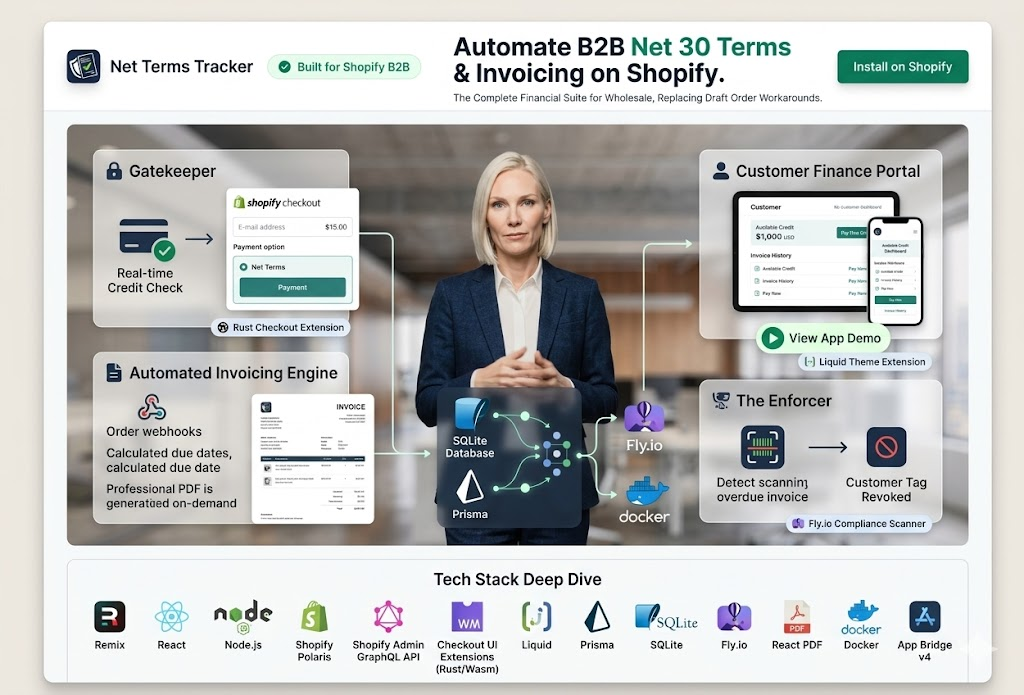
The Problem: Wholesale Commerce Still Runs on Spreadsheets
If you've ever worked in B2B wholesale, you know the pain. A retailer places a large order. The merchant extends them Net 30 payment terms — the retailer has 30 days to pay the invoice. Simple enough in theory. In practice? The merchant is now tracking that debt in a Google Sheet, emailing PDF invoices manually, and losing track of which customers are overdue.
Shopify is the dominant platform for commerce in 2026, but its native checkout has always been built around immediate payment. You add to cart, you check out, you pay now. The concept of "place the order today, pay in 30 days" simply doesn't exist in the standard Shopify flow. Merchants either bolt on a third-party invoicing tool (usually expensive, often clunky) or resort to offline tracking.
Net Terms Tracker was built to solve this for Shopify Plus merchants. The goal: a fully embedded app that manages the entire net terms lifecycle — from credit applications and approvals, to order creation, invoice generation, payment tracking, and overdue alerting — without the merchant ever leaving Shopify admin.
Scope: This post covers the engineering decisions behind the app — specifically the checkout enforcement mechanism, the invoicing pipeline, and the customer-facing finance portal. If you're a merchant evaluating B2B tools, the portfolio page gives a better product overview.
Tech Stack Overview
Before diving into individual modules, here's the full picture of what powers Net Terms Tracker:
- Frontend + Backend: Remix (React Router v7) — one framework for server-side rendering, API routes, and Shopify OAuth
- UI Components: Shopify Polaris — Shopify's design system, keeping the app visually native inside admin
- Shopify Integration: GraphQL Admin API, App Bridge v4, Checkout UI Extensions
- Checkout Logic: Rust compiled to WebAssembly, deployed as a Shopify Checkout UI Extension
- Database: SQLite (development) / Prisma ORM — lightweight and sufficient for per-merchant data isolation
- PDF Generation: Puppeteer running in a headless Chrome instance on the server
- Infrastructure: Fly.io with Docker — multi-region deployment, zero-config scaling
- Auth: Shopify Partner OAuth — the app authenticates merchant admins via Shopify's OAuth flow, no separate auth system needed
The stack is deliberately boring where boring is good (Prisma, SQLite, Polaris) and deliberately interesting where performance matters (Rust/WASM for checkout). Let me explain each major module.
Module 1: The Rust Checkout Gatekeeper
This is the piece I'm most proud of, and the one that raised the most eyebrows during development. The core question: how do you prevent a customer without approved credit from completing an order on net terms?
Shopify's Checkout UI Extensions allow you to inject custom UI and logic into the checkout flow. You can display information, collect custom fields, and — critically — block checkout progression based on your own conditions. The extension runs in a sandboxed environment inside the checkout, which means the code needs to be fast, stateless, and safe. Rust compiling to WASM is a natural fit.
The flow works like this:
- Customer reaches checkout and selects "Net 30" as their payment method
- The Checkout UI Extension fires a request to the app's backend, passing the customer ID and requested credit amount
- The backend checks the customer's credit status, remaining credit limit, and overdue balance in the Prisma database
- The Rust/WASM module evaluates the gating logic — approved, denied, or pending — and returns a structured decision object
- The extension renders the appropriate UI: green approval, a pending message with estimated review time, or a hard block with a link to the finance portal
// Rust: Core credit eligibility logic (simplified)
// Compiled to WASM and called from the Checkout Extension

use wasm_bindgen::prelude::*;
use serde::{Deserialize, Serialize};

#[derive(Serialize, Deserialize)]
pub struct CreditDecision {
    pub approved: bool,
    pub reason: String,
    pub available_credit: f64,
    pub has_overdue: bool,
}

#[wasm_bindgen]
pub fn evaluate_credit(
    limit: f64,
    outstanding: f64,
    overdue_balance: f64,
    order_amount: f64,
) -> JsValue {
    let available = limit - outstanding;
    let has_overdue = overdue_balance > 0.0;

    let decision = if has_overdue {
        CreditDecision {
            approved: false,
            reason: "Outstanding overdue balance. Please clear before placing new orders.".to_string(),
            available_credit: available,
            has_overdue: true,
        }
    } else if order_amount > available {
        CreditDecision {
            approved: false,
            reason: "Order exceeds available credit limit.".to_string(),
            available_credit: available,
            has_overdue: false,
        }
    } else {
        CreditDecision {
            approved: true,
            reason: "Approved.".to_string(),
            available_credit: available - order_amount,
            has_overdue: false,
        }
    };

    serde_wasm_bindgen::to_value(&decision).unwrap()
}
Why Rust and not just JavaScript? A few reasons. The checkout extension environment has strict performance budgets — Shopify's runtime is intolerant of slow extensions, and a sluggish checkout is a conversion killer. WASM modules start cold in microseconds. Rust also gives us memory safety guarantees in a context where we're processing financial data — no null pointer exceptions, no unexpected type coercions. The logic is pure and testable with standard Rust unit tests before it ever touches the browser.
The gating logic itself is straightforward — the sophistication is in the composition. By separating the eligibility rules (Rust) from the data fetching (Remix loader) and the UI rendering (React/Polaris), each layer is independently testable and replaceable.
Module 2: Shopify OAuth and Session Management
Shopify app authentication is notoriously finicky, especially with embedded apps using App Bridge. The standard pattern involves OAuth redirects, session tokens, and a careful dance between the Shopify admin iframe and your app's backend. Remix's loader and action model actually makes this cleaner than it was with Next.js API routes.
// app/routes/auth.$.tsx — Shopify OAuth entrypoint
import { authenticate } from "~/shopify.server";

export async function loader({ request }: LoaderFunctionArgs) {
  // Shopify's authenticate.admin handles token exchange,
  // session storage, and redirect back to the app.
  await authenticate.admin(request);
  // If we get here, auth succeeded. Redirect to app root.
  return redirect("/");
}

// app/routes/_index.tsx — Protected app entrypoint
export async function loader({ request }: LoaderFunctionArgs) {
  const { admin, session } = await authenticate.admin(request);

  // Fetch merchant's credit settings from our DB
  const merchantConfig = await db.merchantConfig.findUnique({
    where: { shop: session.shop },
  });

  // Fetch outstanding invoices via GraphQL
  const response = await admin.graphql(`
    query GetDraftOrders {
      draftOrders(first: 50, query: "status:open") {
        edges { node { id name totalPrice createdAt customer { displayName } } }
      }
    }
  `);

  return json({ merchantConfig, draftOrders: response.data });
}
One thing that caught us early: Shopify sessions are per-shop, not per-user. If a merchant has multiple staff members using the app, they all share the same shop session. This means any state that needs to be user-specific (like draft approvals or audit logs of who approved what) needs explicit user tracking via Shopify's Staff Accounts API, not just the session.
Module 3: Automated PDF Invoice Generation
When a merchant approves a credit application and a customer places an order on net terms, the app needs to automatically generate a professional invoice and email it to the customer. This sounds simple until you try to build it.
We evaluated three approaches: a pure JavaScript PDF library (jsPDF, PDFKit), a templating service like DocRaptor, and headless Chrome rendering an HTML template. We went with headless Chrome via Puppeteer for one reason: the output is pixel-perfect and trivially maintainable. Invoice templates are just HTML and CSS. Designers can edit them. The output matches exactly what you see in a browser preview. No fighting with a PDF library's layout engine.
The invoice template is a Remix route that returns HTML when hit directly (for preview) or PDF when hit with a specific Accept header. Puppeteer on the server navigates to that route with a valid session token, captures the PDF, stores it in a temporary buffer, and pipes it to the email service.
Fly.io note: Puppeteer in a Docker container on Fly.io requires a few non-obvious configuration steps. You need to install Chromium explicitly in your Dockerfile, set the executablePath to the installed Chromium binary, and pass --no-sandbox and --disable-dev-shm-usage flags. We burned two days on this. The Fly.io forum thread is worth bookmarking if you go this route.
Module 4: The Customer Finance Portal
The final major module is a self-service portal for customers — a lightweight web app (separate from the Shopify admin embed) where customers can view their credit limit, outstanding balance, invoice history, and submit a credit application if they don't have terms yet.
This is a public-facing Remix route, not embedded in Shopify admin. Customers authenticate via a magic link emailed to their registered Shopify customer email. The session is short-lived (4 hours) and scoped to read-only data. No Shopify OAuth needed here — just a simple JWT stored in an httpOnly cookie.
The portal was the most requested feature during user testing. Merchants discovered that the biggest friction in their net terms workflow wasn't the invoicing — it was customers calling the accounts department to ask basic questions: "How much credit do I have left? Is my invoice due yet? Can I see last month's orders?" The portal reduced those inbound calls to near zero for merchants using it in beta.
Deployment: Fly.io + Docker
Fly.io has become my default for Remix apps. The mental model is simple: you define a Dockerfile, you run fly launch, and you get a globally distributed app with automatic HTTPS, health checks, and rolling deploys. For a Shopify app where latency directly impacts checkout conversion, multi-region deployment matters.
We deploy to three regions — IAD (US East), LHR (London), and SYD (Sydney) — with Fly's anycast routing directing each merchant's traffic to the nearest instance. SQLite per-region replication is handled via Fly's LiteFS, which gives us distributed SQLite with Raft consensus. For a single-tenant-ish app (each merchant's data is isolated anyway), this is far simpler than managing a global Postgres cluster.
What We'd Do Differently
No project survives contact with production without regrets. Here are ours:
Start with more schema flexibility. We designed the initial Prisma schema around our first merchant's workflow, then had to run migrations when subsequent merchants had different term structures (Net 15, Net 60, 2/10 Net 30 with early payment discounts). Adding flexibility to a schema after launch is always more painful than building it in from the start.
Invest earlier in the test harness. The Remix + Shopify testing story is still immature. We ended up with a mix of Vitest unit tests for pure logic, Playwright end-to-end tests for critical flows, and a mock Shopify admin environment for integration tests. Getting all three to run reliably in CI took longer than it should have. This is table stakes — don't skip it.
The customer portal should have been part of v1. We built it as a v2 feature, but the feedback loop from early merchants made it clear it should have shipped from day one. When building B2B tools, always ask: does the customer of your customer also have a job to do? Usually they do.
Closing Thoughts
Net Terms Tracker is the kind of app that looks simple on the surface — "it tracks invoices" — but hides surprising depth once you account for the full range of merchant workflows, edge cases in Shopify's checkout, and the operational reality of B2B commerce. The Rust/WASM checkout gatekeeper was technically interesting to build, but the real leverage came from deeply understanding the merchant's pain: the lost invoices, the awkward phone calls, the spreadsheets they'd been maintaining for years.
Good software is built by understanding the workflow first and choosing the technology second. The tech stack in this case — Remix, Rust/WASM, Puppeteer, Fly.io — is justified by the specific constraints of the problem, not by fashion.
If you're a Shopify Plus merchant looking to automate your B2B terms workflow, or a developer curious about any of the specific implementation decisions, I'd love to talk.