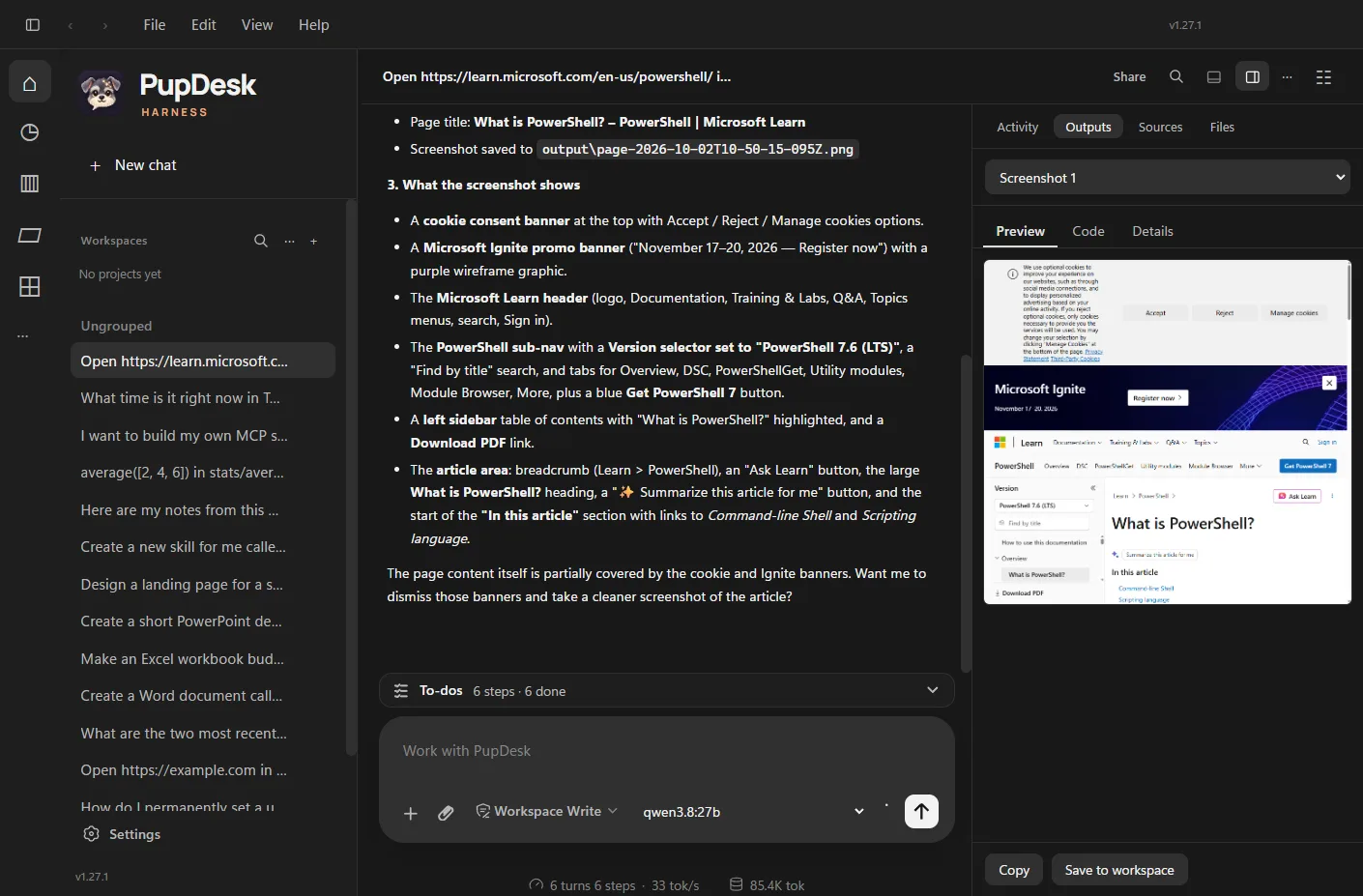
A chat window in a browser can tell you how to do something. It cannot open the file, run the command, check the page or save the spreadsheet. You end up copying text back and forth between the assistant and your own computer.
PupDesk was built to close that gap. It runs on your PC, and it does the work there, with you watching.
What it does
Ask in plain words and PupDesk picks the tools. It reads and writes files in the folder you give it, runs commands and tests, and opens web pages in its own Microsoft Edge window to read them, click through and take screenshots. Pages, documents and screenshots open in a panel next to the chat, so you see the result instead of a description of it.
You bring the model. Claude, OpenAI, Gemini, DeepSeek and OpenRouter all work, and so do local models through Ollama or LM Studio, which keep everything on your machine.
Ready out of the box
Most AI tools ship empty and leave the setup to you. I wanted PupDesk to be useful on first launch, so I looked at which add-ons people actually install across AI assistants. That meant npm downloads, Docker's MCP catalog, Claude's plugin directory, the Cline and Zed marketplaces, and ClawHub. The most used ones whose licence allows it come pre-installed:
Connectors
Playwright for browser control, Context7 for current documentation on thousands of libraries, and Microsoft Learn for Windows, PowerShell and .NET. A GitHub connector is there too. It switches on when you add your own access token.
Skills
Word, Excel and PowerPoint files, GitHub through the gh command line, distinctive web page design, and two skills for building your own skills and connectors.
The Superpowers plugin
Thirteen proven coding workflows: brainstorming, writing plans, test-driven development, systematic debugging, code review and verification before calling something done.
They behave like anything you add yourself. Edit them, switch them off or remove them, and a removed one stays removed. You can restore any of them from Settings.
You decide what it can touch
An assistant that runs commands on your computer needs clear limits. Every chat has an Access setting. Read only lets it look but never change anything. Workspace Write lets it edit inside your folder and asks before each command. Full access runs without asking, for when you trust the task. Before anything leaves those limits, an approval card shows exactly what it wants to run.
Long tasks keep going
Real work rarely fits in one reply. When PupDesk reaches a step or context limit it carries its progress forward and continues, instead of stopping halfway and asking you to start again. If it gets stuck in a loop it pauses and tells you, rather than burning through your model credits.
Tested the way you will use it
Before this release I used every pre-installed tool through ordinary chats, with a local model, and checked the results by hand. The Word report had real heading and list styles. The budget workbook had live formulas. The debugging workflow reproduced the bug before touching the code. That testing also found problems, the biggest being browser screenshots the assistant could not see. Those are fixed in 1.27.1.
Download: get the latest PupDesk installer for Windows 10 and 11 (x64). PupDesk is free. Charges from your model provider, if you use a paid one, are separate.
Where it goes next
Next up is sign-in support for account-based connectors like Google Drive, Notion and Slack, so they can come pre-installed too. If PupDesk saves you time and you want to help it along, you can buy me a coffee. And if something does not work the way you expected, I want to hear about it.